GTA 6 finally arrives this Thursday, November 19, on PlayStation 5 and Xbox Series X|S. Microsoft says it’s the most pre-ordered title of all time on the Microsoft Store, so expect a busy launch night. The good news: if you’ve pre-ordered, you can have everything installed before then. Here’s how to get GTA 6 ready to play on day one, plus the free extras Rockstar is adding at launch.
What you need
- A pre-order. Pre-loading is available for everyone who pre-ordered GTA 6 digitally. If you bought the code-in-box version, Rockstar says you can activate the code and start pre-loading as soon as you get it. Code-in-box copies have been in stores since November 12.
- Up to 212 GB of free space. According to Rockstar Support, the pre-load needs up to 212 GB of available space, depending on your console.
- An internet connection, ideally a fast one, since it’s a very large download.
Step 1: Make room on your console
Check your free space first. If you’re short, delete or move games you aren’t playing right now; you can always download them again later. For more on why the file is so big, see our story on GTA 6’s massive download.

Step 2: Start the pre-load
Pre-loading is already open. It began on Tuesday, November 10, at midnight local time on PlayStation 5, and at 12 a.m. GMT on Xbox Series X|S. If your pre-order hasn’t started downloading, open the game in your library and start the download manually. Rockstar Support links to the official PlayStation and Xbox pre-order guides if you need help.
Step 3: Turn on automatic downloads
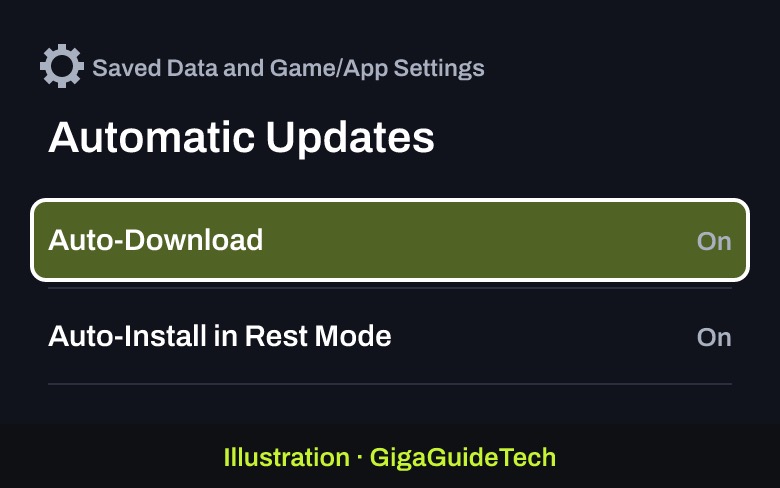
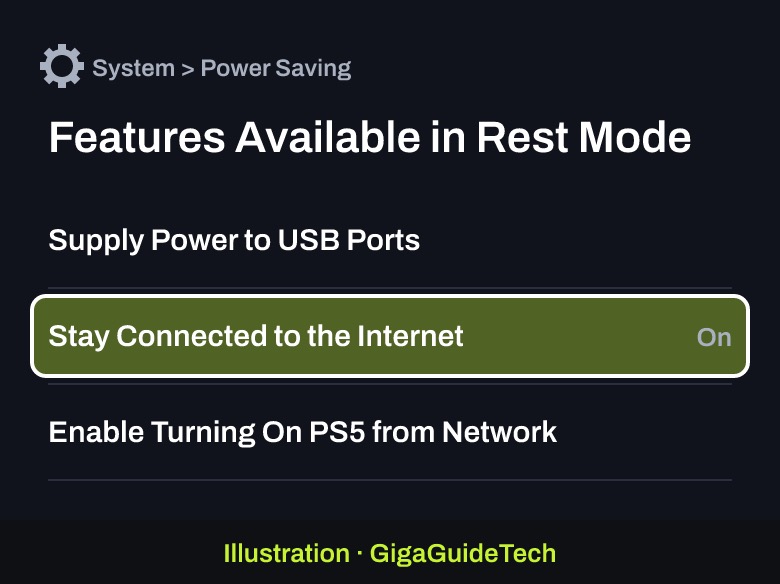
To make sure the game and any last-minute updates finish downloading while you’re away, Rockstar recommends turning on automatic downloads and leaving your console in Rest Mode or Sleep mode.
On PlayStation 5:
- Go to Settings > Saved Data and Game/App Settings > Automatic Updates.
- Turn on Auto-Download (or Auto-Install in Rest Mode, if you also want updates installed for you).

Illustration: PS5: Settings > Saved Data and Game/App Settings > Automatic Updates - Go to Settings > System > Power Saving > Features Available in Rest Mode.
- Turn on Stay Connected to the Internet, then put the console in Rest Mode when you’re done playing.
Illustration: PS5: Settings > System > Power Saving > Features Available in Rest Mode
On Xbox Series X|S: Rockstar says to enable automatic updates and keep the console on or in Sleep mode. Microsoft’s Xbox update guide shows where to find the setting.
Step 4: No Series X|S? Play on Xbox One with the cloud
Here’s a nice surprise: GTA 6 will be playable on day one through Xbox Cloud Gaming on Xbox One and Xbox Series X|S, starting at 1 a.m. ET on November 19, according to Xbox Wire. Cloud play uses Xbox Series S graphics settings, and you still need to buy the game. As with any streaming, Rockstar notes that your connection speed can affect performance. The game also fully supports Remote Play on PlayStation and Xbox. For more on the cloud deal, see how Xbox locked up GTA 6 streaming rights.
What to expect on launch day
- Built for current consoles: Rockstar says GTA 6 was developed from the ground up for PS5 and Xbox Series X|S, targeting 30 frames per second.
- PS5 Pro extras: sharper visuals with PlayStation Spectral Super Resolution (PSSR) and ray-traced shadows that are only on PS5 Pro.
- DualSense and 3D audio on PS5: haptic feedback throughout the game (adjustable in the accessibility settings), Tempest 3D Audio support and improved load times.
- Free poster and map: on November 19, Rockstar is adding a printable GTA 6 cover art poster and a map of Leonida as a free digital download on the official site. A double-sided physical version will follow at the Rockstar Store shortly after launch.
- Pre-order bonus: on Xbox, pre-orders placed before November 19 include the Vintage Vice City Pack and one month of GTA+, according to Xbox Wire.
Want the full picture before Thursday? Read everything confirmed about GTA 6.
Sources: Rockstar Newswire: Pre-Load Begins on November 10, Rockstar Newswire: Pre-Load Grand Theft Auto VI Now, Rockstar Support: GTA VI Pre-Load FAQ, PlayStation Support, Xbox Wire